| Command & Control |
This is voice navigation of the application. An example is a Radiologist saying "Load my CT Right Ankle template" and that would kick off an action on the desktop/within the app. Or they could say "Go To History of Present Illness Section" and the application focus would change to that field. This could accomplish this 1 of 2 ways. (1) use nVōq grammar based Matching Service (this usually requires another invocation method in the app, like a separate push button for commands) (2) use nVōq dictation services APIs and perform Keyword spotting for the Command Phrase, within their application.
|
| HTTP vs WebSockets |
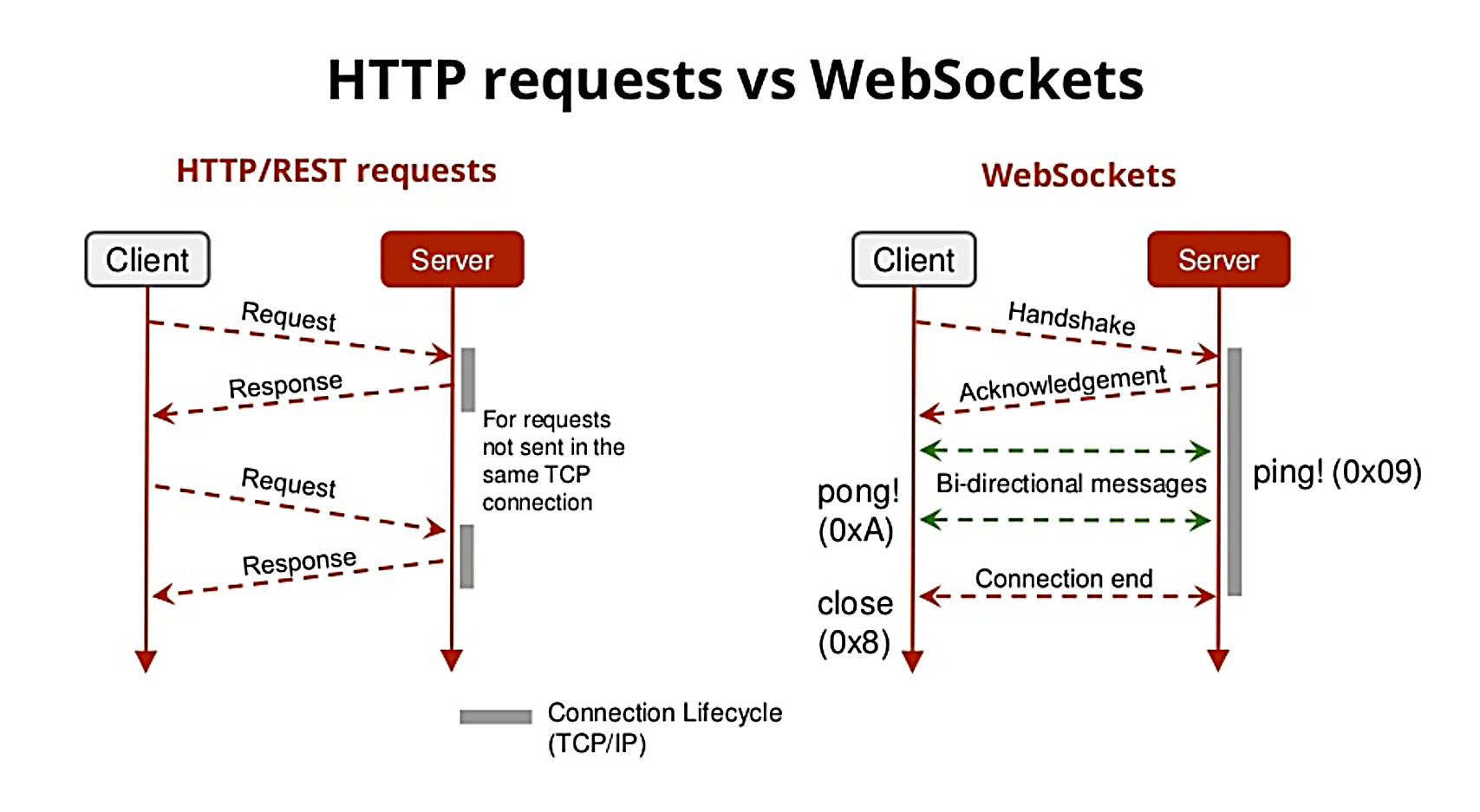
HTTP and WebSocket both are communication protocols used in client-server communication. HTTP is unidirectional where the client sends the request and the server sends the response. WebSocket is bidirectional, a full-duplex protocol that is used in the same scenario of client-server communication, unlike HTTP it starts from ws:// or wss://. It is a stateful protocol, which means the connection between client and server will keep alive until it is terminated by either party (client or server). Here are some key differnces between HTTP and WebSockets:
- HTTP is a uni-directional communicational protocol, whereas WebSockets is bi-directional.
- Whenever a request is made through HTTP, it creates a connection at the client(browser) and closes it once the response from the server is received. Whereas in WebSockets, it keeps the connection open until the state has died.
- Http should not be used, when you don’t want the connection to be opened for a long time, whereas WebSockets can be used in that case.
- Http works poorly with frequent kind of application, which overloads the server. Whereas WebSockets can be used with Chat, Trading, frequent updates kind of application, where a request is made very frequently.
- Http uses HTTP or https protocol for sending a request(like http://www.google.com), whereas WebSockets uses ws protocol( like ws://google.com). The connection process is show in the below diagram:
|
| Topic |
This is a key component of creating a transcript from a dictation. It will take the audio form, translate it to phonemes, translate the phonemes into a word, translate the word into a sentence, and finalize the transcript using the ITN process (dictionary, corpus, vocabulary, substitutions, and sentence modeling). |